A 401 means check your API key. A 404 usually means there's a typo in your model name. You don't need a conversation with Claude to fix either one.
Claude can explain any API error you paste into it, and that's a good habit for the strange edge cases. But plenty of these errors take seconds to fix once you know what they mean, and knowing the basics gets you a better answer when you do need help.
This guide covers every error the Claude API returns: what it means, why it happens, and how to fix it. To show real responses, we built a small test app called the Claude API Error Lab and broke things on purpose.
Every Claude API error falls into one of two groups, and the status code tells you which one.
• Codes starting with 4: Something on your end needs fixing. It could be your key, your request, or your account.
• 500-level codes and 529: The problem is on Anthropic's side. You don't need to change anything, so wait and try again.
There are two exceptions. A 429 is on your side, but the usual fix is to slow down, and a 504 is a timeout you solve by changing how you send the request. Both get a closer look below.
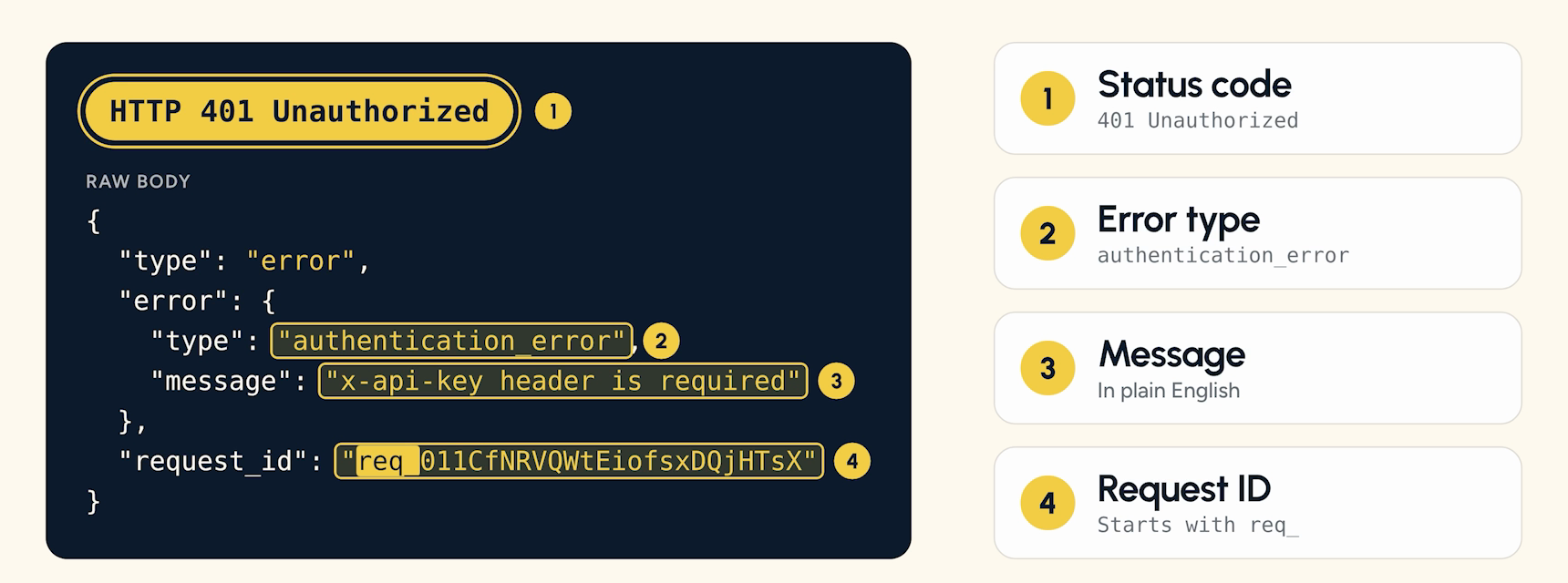
A Claude API error gives you four things to work with:
• Status code: The number, like 401.
• Error type: The category, like authentication_error.
• Message: A plain English description of what went wrong.
• Request ID: A string that starts with req_.
Read the message first, because that's usually where the answer is. Hang on to the request ID too, since that's how Anthropic support finds your exact request.
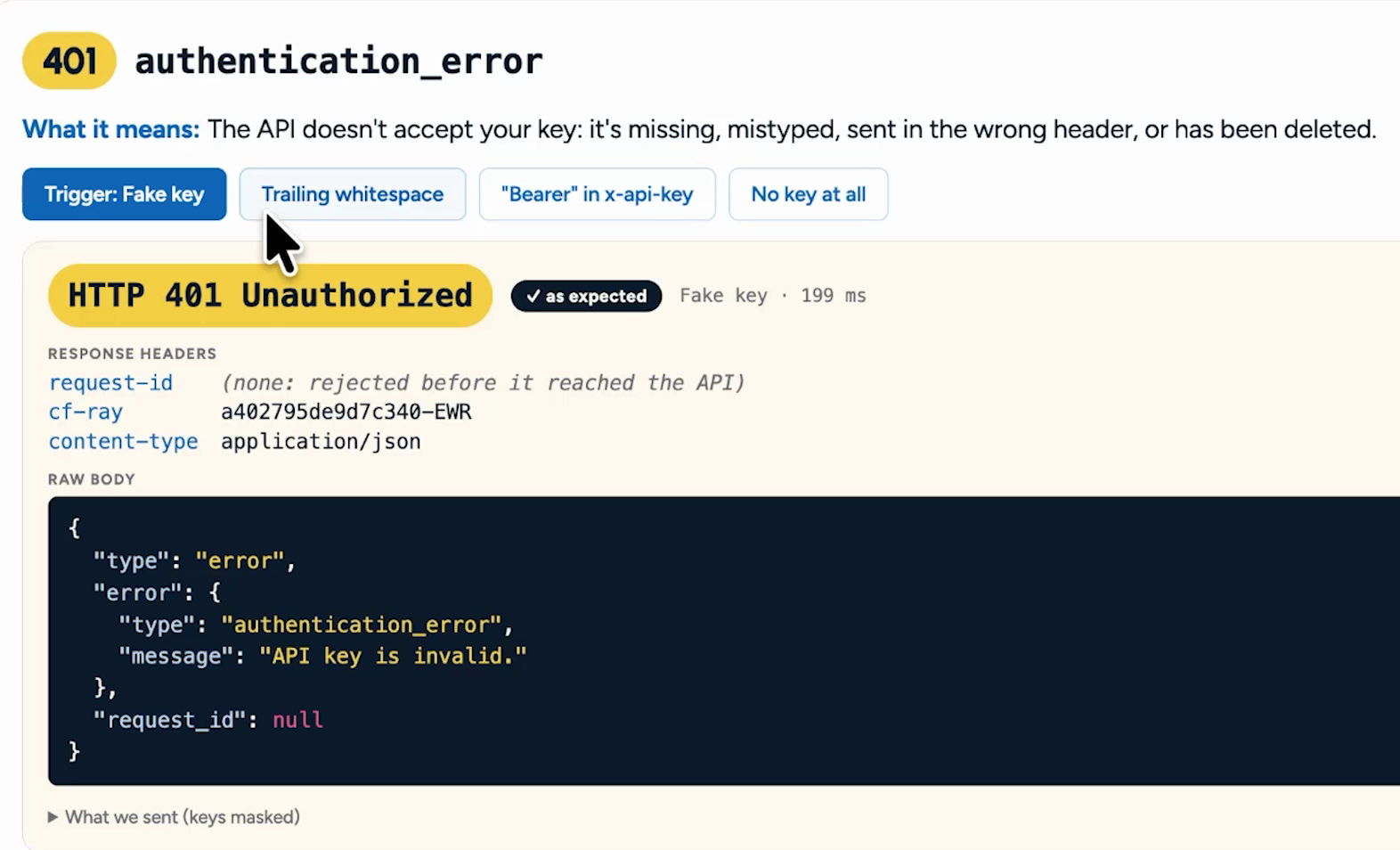
A 401 authentication_error means the API won't accept your key. The key is missing, mistyped, sent in the wrong header, expired, or deleted.
We triggered this one four ways with live requests:
• A fake key: The message says the API key is invalid.
• A stray space: Copy an extra space along with your key and you get the same 401.
• The word Bearer in the x-api-key header: That header takes the key on its own. Bearer belongs in the Authorization header.
• No key at all: The message tells you the x-api-key header is required.
To fix it, start wherever your key is stored, whether that's an environment variable or a saved connection in your automation tool. Paste in a clean copy with no extra characters, then confirm in Claude Console that the key is still active.
One quirk from our testing: a bad key returned no request ID. If you're hunting for one on a 401, you can stop.
A 429 rate_limit_error has two very different causes. One clears up in seconds, and the other can last until the first of next month.
You sent too much, too fast. Rate limits cover requests, input tokens, and output tokens per minute.
To show this, we set a limit of 2 requests per minute on a test workspace and sent a burst of 50 requests. Most came back as 429s, and the message says the request would exceed the rate limit we configured in that workspace. A single request still returned a normal 200.
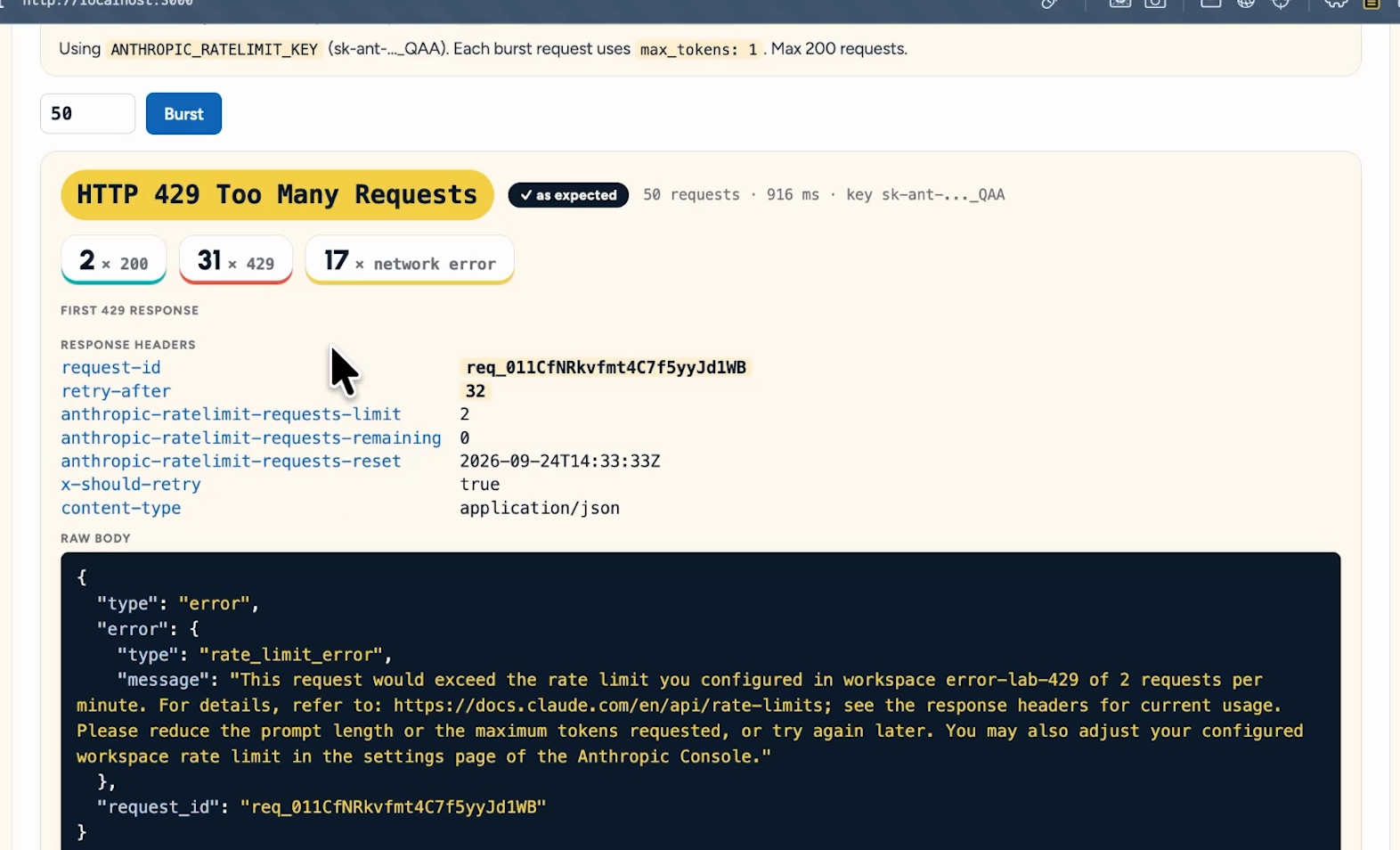
The clue to look for is the retry-after header. Ours said 32, which means wait 32 seconds before trying again. That number changes from one response to the next, so read it every time.
• Wait it out: Hold off for the full retry-after time before you resend.
• Add a delay: Put a pause between requests in your no-code tool or app so they spread out.
• Ramp up gradually: A sudden jump in usage can trigger acceleration limits, which return 429s of their own.
Anthropic's default limits are high, so you're unlikely to need an increase unless you run a production app with a large user base. Short bursts can still trip them, because a limit of 60 requests per minute can be enforced as one request per second.
A 429 can also mean your organization reached its usage tier's monthly spend cap. That's $500 on the Start tier, $1,000 on Build, and $200,000 on Scale.
This version has no retry-after header, and its error details include enforced_spend_limit_reached. Retrying won't help, because access stays paused until 00:00 UTC on the first of next month unless you move to a higher tier.
A spend limit you set yourself behaves differently. It returns a 400 invalid_request_error instead, and raising or removing the limit gets you back online. If you haven't set one yet, here's how to set spend limits in Claude Console.
A 400 invalid_request_error means your request reached the API, but something in it is wrong. This is one of the friendlier errors, because the message names the field that caused the problem.
We triggered it two ways:
• No max_tokens: Claude needs an upper limit on how long its response can run, so leaving this field out fails.
• Temperature set to 5: The valid range was 0 to 1, so the request failed every time, and the message said so.
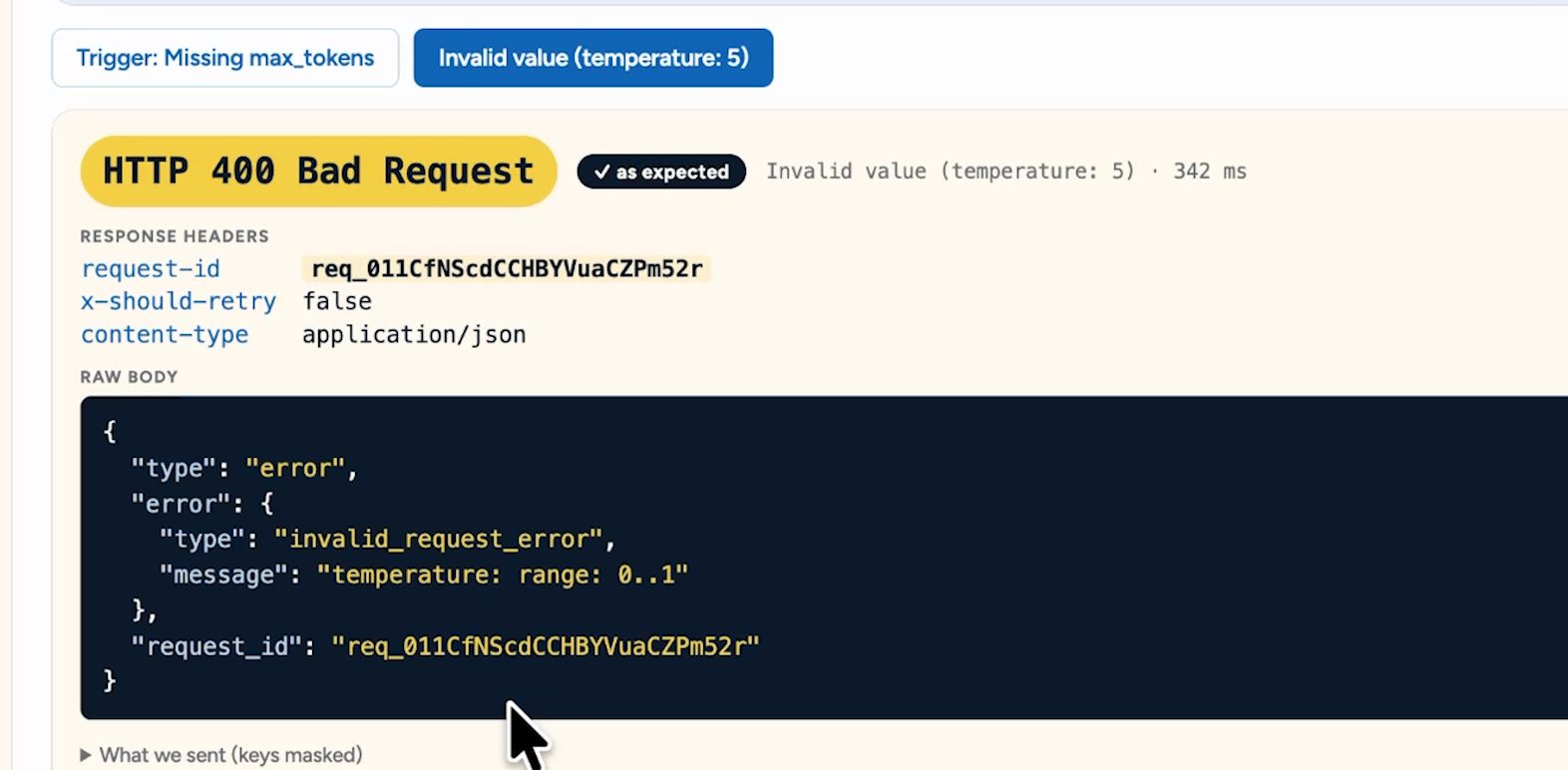
The fix is simple: read the message, correct that field, and resend. Every Messages API request needs model, max_tokens, and messages.
One recent change is worth catching before it catches you. API version 2026-10-21 removes temperature, top_p, and top_k, so on that version, sending any of them returns a 400 even at the default value. Delete those fields from older workflows when you upgrade.
These come up less often, and each one has a short fix.
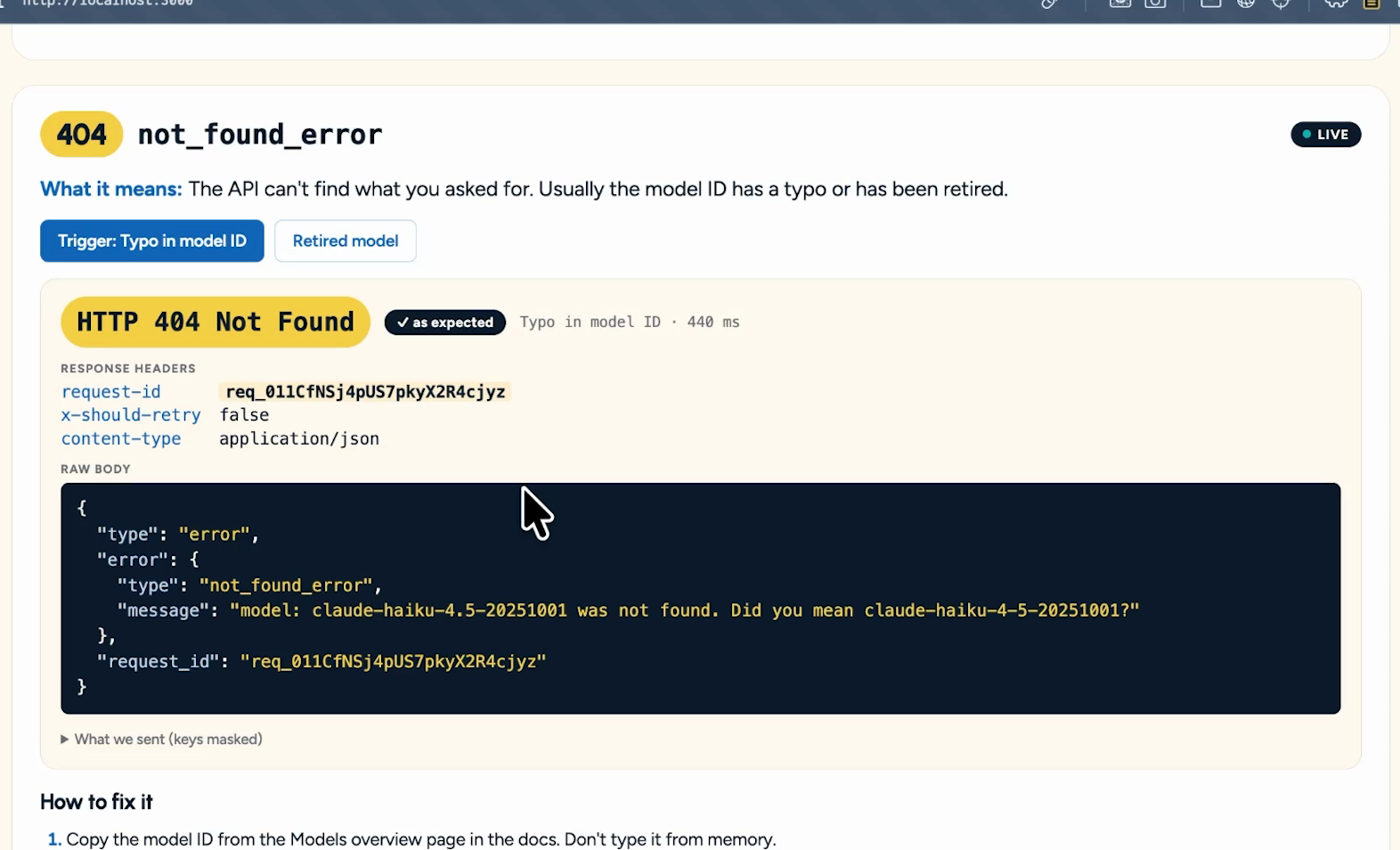
A not_found_error usually points to the model ID. You've either made a typo, picked a model that doesn't exist yet, or used a retired one.
The syntax is easy to miss. Model IDs use hyphens, so claude-haiku-4.5-20251001 fails and claude-haiku-4-5-20251001 works, and the error message asks if you meant the correct ID. Copy model IDs directly from Anthropic's docs instead of typing them by hand.
A request_too_large error means you're over the size limit. The Claude API currently caps Messages requests at 128 MB, and you can't change that. Limits are lower on some cloud platforms, like Amazon Bedrock.
Compress the file before you send it. If that isn't enough, use the Files API (up to 500 MB) or the Batch API (up to 256 MB), which add a little complexity but get the job through.
This error gets rejected before it reaches Anthropic's API servers, and it came back with no request ID in our testing.
A billing_error means there's a problem with your billing or payment information, like a card that stopped working. This has nothing to do with hitting a spending limit.
Update your payment details in Claude Console. Keep in mind that API usage is billed separately from a paid Claude plan.
A permission_error means your key is valid, but it isn't allowed to do what you asked. Check which workspace the key belongs to in Claude Console.
Admin endpoints for users, workspaces, and API keys need admin-level credentials, so a workspace key won't work there. Retrying won't help either, so ask an org admin to check your role.
An api_error means something failed inside Anthropic's systems. Your key and your request aren't the problem.
Retry with exponential backoff, which means waiting longer between each attempt. Anthropic's SDKs do this twice by default, but a raw HTTP step in a no-code tool won't retry unless you set that up. Check Claude's status page, and if the error persists, send Anthropic support the request ID.
An overloaded_error means the API is busy for everyone. A 429 is about your usage and a 529 is about all traffic, so changing keys or tiers won't help. Back off and retry, the same way you would with a 500.
A timeout_error means the request ran out of time. This is the one server-side error you fix by changing your request, and requests that could run past 10 minutes are the ones to watch.
Switch long requests to streaming or the Batch API. If you don't need a long answer, lower max_tokens so Claude has less to generate. The same error type can also arrive with a different status code, like a 500, so check the type as well as the number.
A conflict_error means your request clashes with the current state of a resource. You'll see it when a name that has to be unique is already taken, or when two bits of code try to change the same thing at once, which is called a race condition.
This one is rare, and the fixes are quick:
• Name conflict: Choose a different name.
• Simultaneous changes: Wait for the other change to settle and try again.
• Repeat collisions: Add a delay to one step, or combine the changes into a single API call.
The trickiest error on this list arrives after a success code. When you stream a response, the API sends a 200 first and delivers the text in pieces, so an overload error can land partway through.
The text stops, and you never receive message_stop, the event that marks a response as complete. Without a check for it, your workflow can pass along a partial answer as if it were the whole thing.
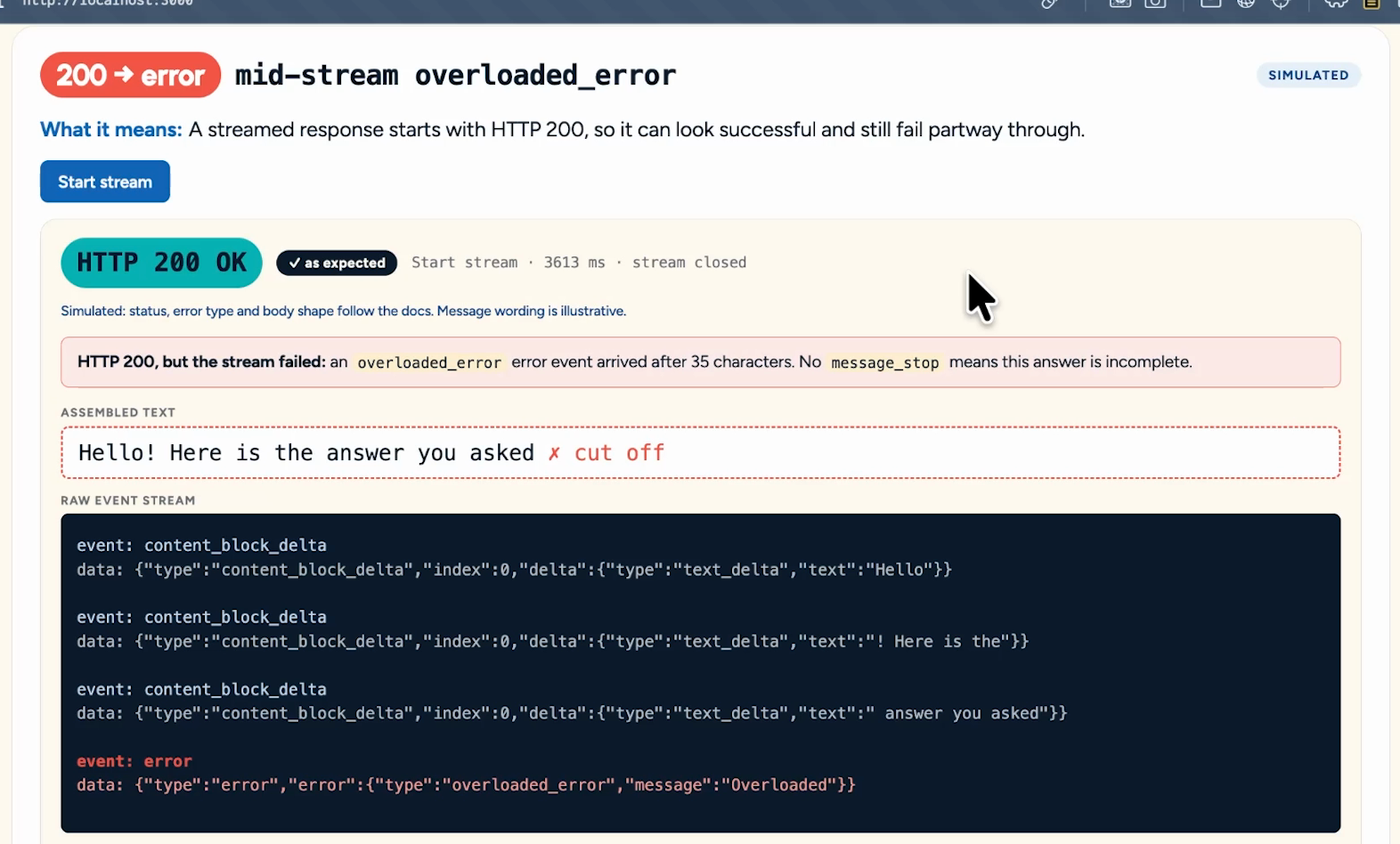
Treat this like a 529. Throw away the partial text, back off, and send the request again, and accept a response only once you see message_stop.
Now that you know what these errors mean, you can ask a much sharper question. Give Claude the status code, the error type, the message, the request ID, and any headers that matter, like retry-after. Never include your API key.
Here's the difference that makes:
• Vague: "Why isn't my Claude API key working?"
• Specific: "My Make HTTP module returns a 401 that says invalid x-api-key. Here's my header setup, with the key removed."
The first prompt gets you a checklist of everything that could be wrong. The second gets you the answer, because you told Claude exactly where to look and it didn't have to burn tokens working out the error itself.
The real payoff is that you can stop handling these by hand. Every error fits one of three responses:
• Wait and retry: A 429 with retry-after, a 500, a 529, or a stream that ends without message_stop.
• Change the request: A 400, 404, 409, 413, or 504. The message usually tells you what to change.
• Stop and alert a person: A 401, 402, or 403, a 429 with enforced_spend_limit_reached, or a 400 from a spend limit you set. Retrying won't help any of these.
Give Claude those rules and let it build them into your workflow. You can be this specific: "Retry 429s after the retry-after time. Retry 500s and 529s with backoff, up to three tries. If the error code says enforced_spend_limit_reached, stop and send me a Slack message. Log the request ID every time."
That's a workflow that handles its own errors, and you didn't have to write it line by line.
Knowing what an error means is half the job. The other half is building a workflow that deals with it on its own, retrying the errors that clear up by themselves and flagging the ones that need a person.
That's what we do at XRAY. We build intelligent workflow systems that keep running when the API pushes back.
Reserve time with an XRAY expert and work through your own build together, live. There's no retainer, so you just book the time you need.
Claude can explain any of these errors, and now you can too. Your job is to direct the tools, not babysit them.