
Someone on your team has an idea worth building.
But to build it, they need API access to a few of your apps: maybe HubSpot, QuickBooks, OpenAI, and Slack.
You want to say yes, because this is the exact kind of initiative you've been asking people to take.
Getting approval from IT is another story.
Three weeks later, there's still no key and the idea is gone. It didn't die because it couldn't be built; it died because the security work around it was harder than the actual build.
Or it got built anyway, on somebody's personal credentials, and nobody told you.
People route around IT for one reason: the unsafe path delivers instant results, and the safe path has no visible end. That's a routing decision, not a character flaw.
Give someone the choice between shipping today on their own API key and waiting an unknown number of weeks for a sanctioned one: which one wins?
At XRAY, we've helped hundreds of businesses put AI and no-code tools into the hands of the people actually doing the work.
The build is rarely the hard part. Rolling it out safely is the part nobody has solved.
To be fair to the software, most modern apps do let you scope a key. Airtable, for example, lets you choose which permissions a token carries and which bases it can reach, which puts it ahead of most.
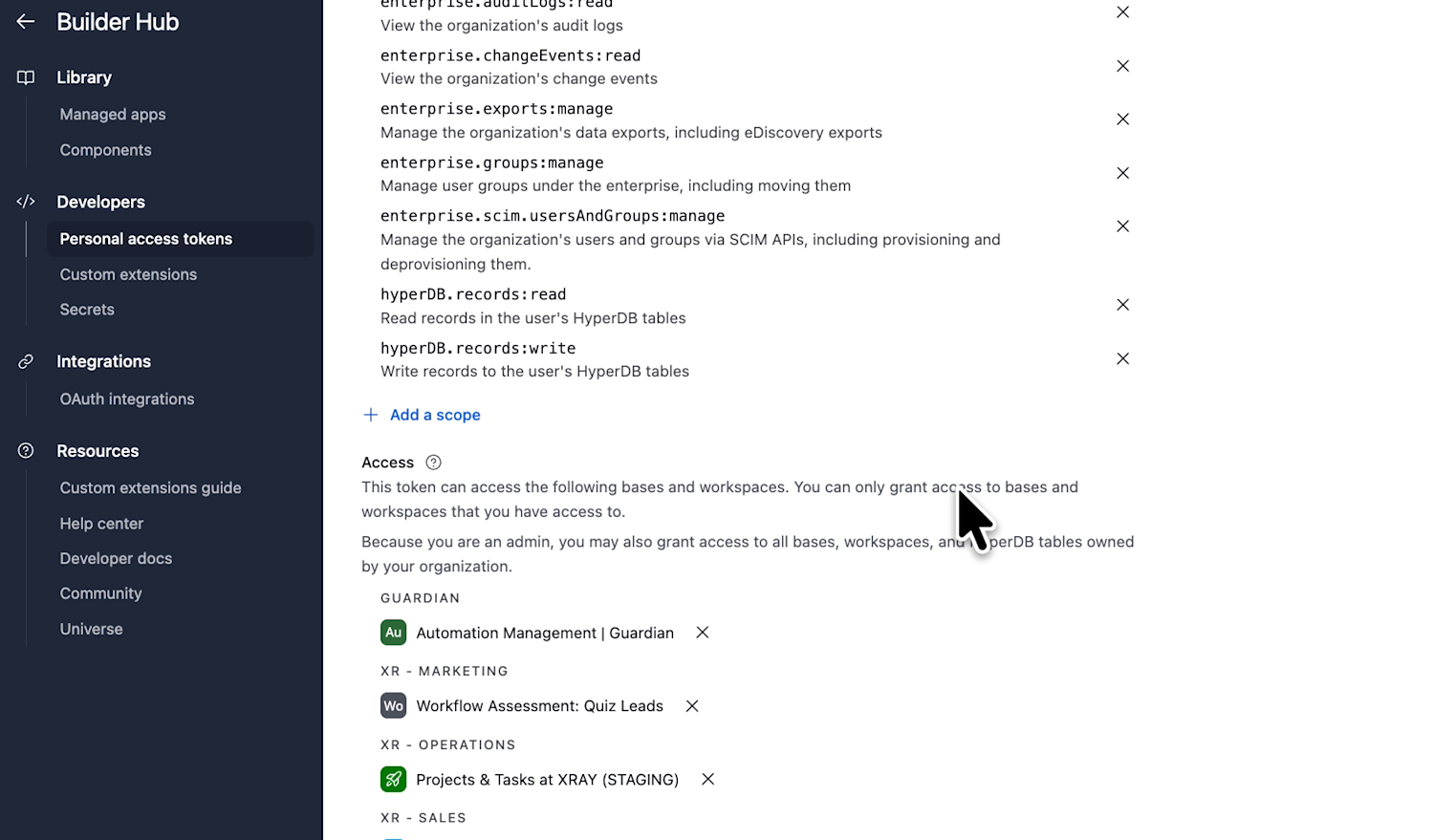
The catch: those permissions are static. Hand that key to a tool, and it carries the same wide permissions everywhere, for everyone who uses it.
So a read-only key for your reporting project and a delete-capable key for your ops team aren't two settings on one token; they're two separate tokens, created separately, tracked separately, revoked separately.
Multiply that by every app you run, then by every team member who asks. The same careful work repeats forever.
Sprawl isn't the only problem here. There’s also the issue of visibility.
Airtable is a fair example precisely because it's better than most: on an enterprise plan, an admin can pull up any user's account, see the list of tokens they've created, and delete them. They can see mutations too (creates, updates, deletes).
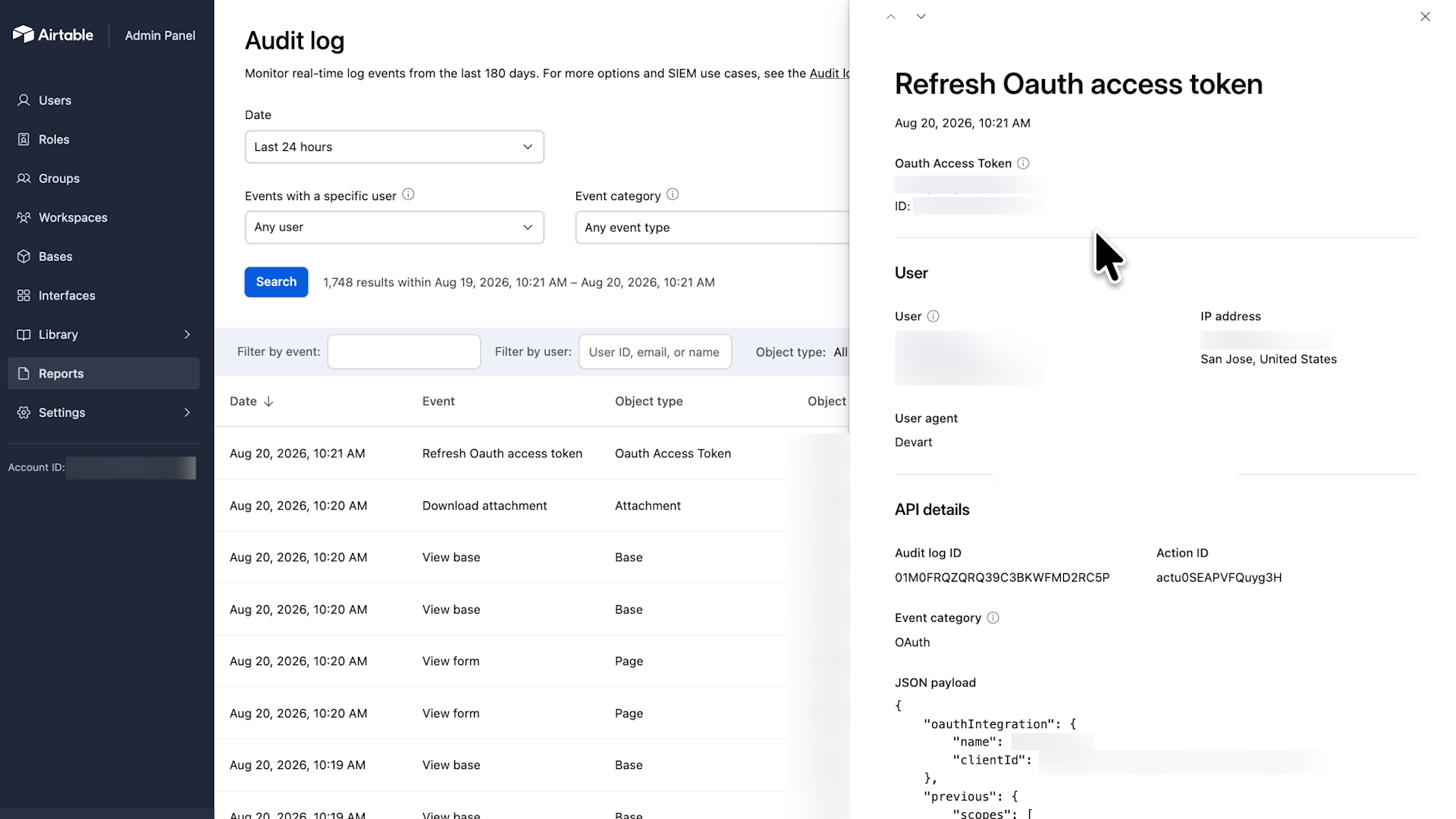
What they can't see: GET requests. A key that quietly reads every customer record you have, every night, for a year, leaves no trace in that admin panel.
That's a billion-dollar platform that's been around since 2013 – one we use every day at XRAY. Most other apps give you considerably less.
Every app draws the line in a different place, which means there's nowhere you can go to ask one simple question: what is actually touching our data right now?
StackOne is a Tool Gateway that helps teams securely roll out AI across their organization by managing the tool layer between AI agents and the apps you use every day.
As a dedicated governance layer, it doesn't replace anything in your stack, and it isn't trying to.
Right now, every app hands out its own keys, its own way, on its own terms: forty apps means forty sets of rules, and forty places to go looking when you need to change a permission or revoke a key. StackOne puts a single door in front of all of them. Your apps connect to StackOne, and anything your team builds connects to StackOne.
Because every request goes through that one door, the door controls three things none of your apps can on their own:
• Who gets in. Authentication happens once, in one place, instead of forty times across forty consoles.
• What they can do once inside. Permissions are set per project, not baked into a token you handed out months ago.
• What actually happened. Every request gets written down in one place, in one format.
We found StackOne recently and moved quickly to partner with them; they sponsored the video this post is based on. We're happy to spread the word regardless, because it fits how we build.
Our philosophy is about the value of the workflow, not the trendiness of the stack. StackOne adds an essential trio of features — authentication, permissions, and logging — to the apps we already use, so our team can build and experiment freely while the security team audits every API call.
Here's what we run: one Airtable token that reaches several bases.
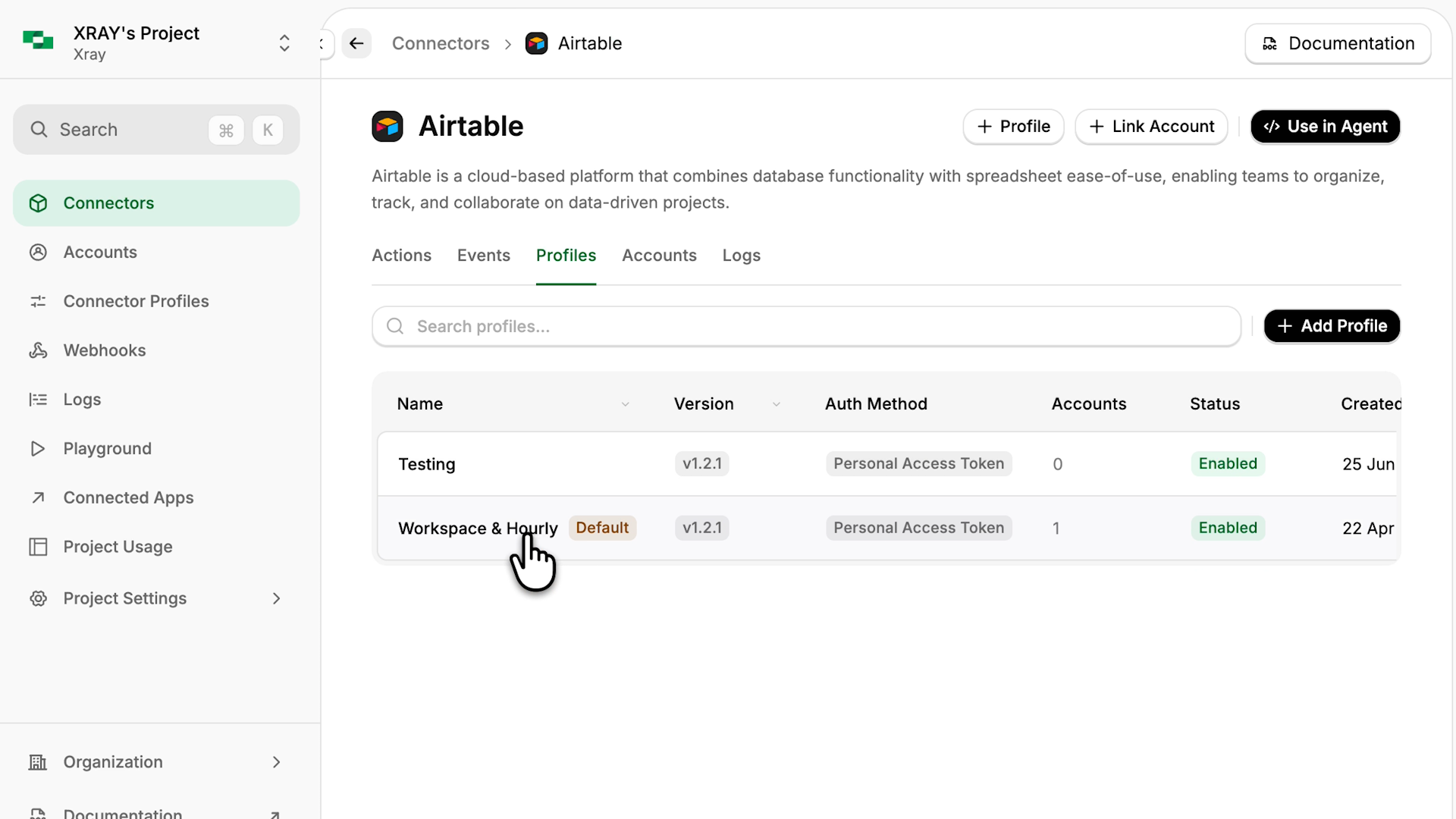
That token lives in StackOne now, not inside some vibe-coded app someone on our team built. Our internal tool doesn't hold Airtable credentials at all anymore.
It talks to StackOne, and StackOne talks to Airtable.
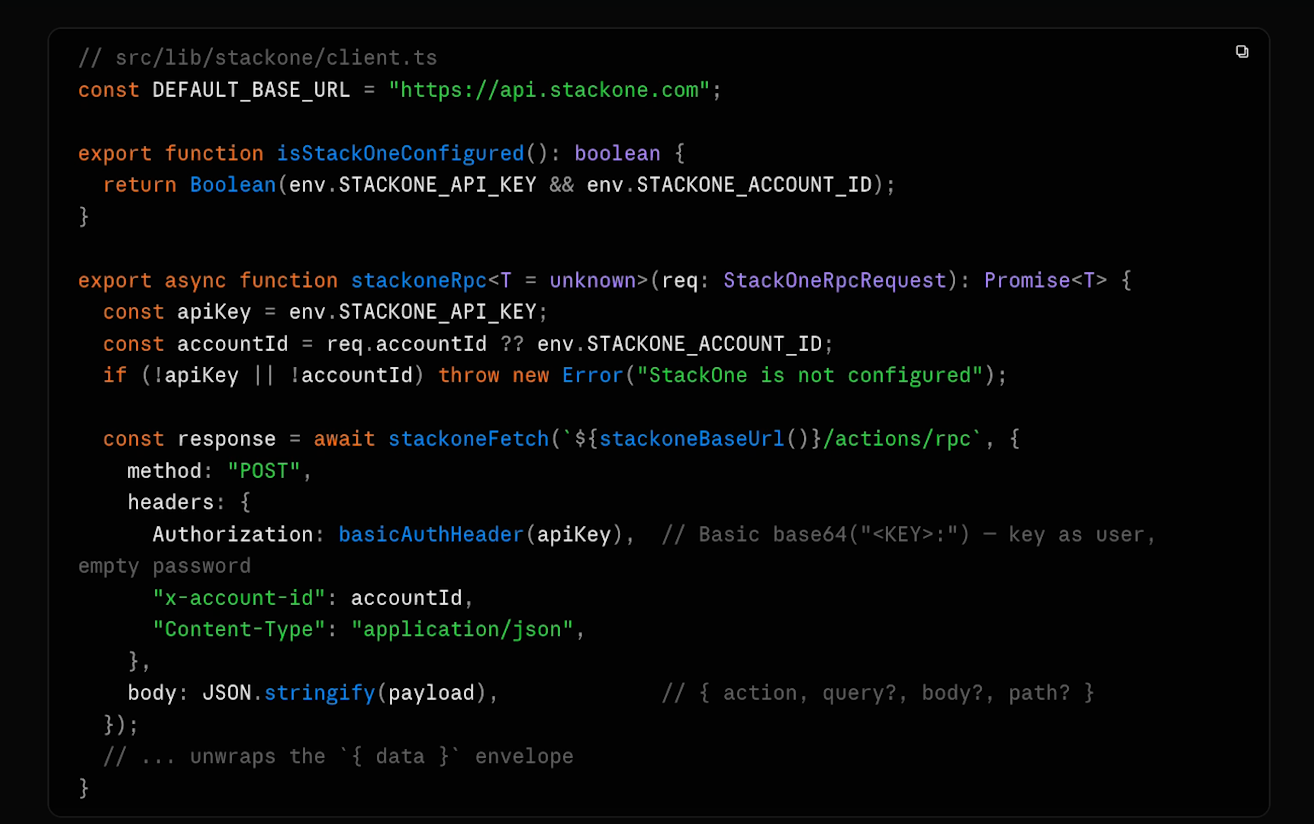
Then you put the rest of your apps behind that same door: HubSpot, Salesforce, ServiceNow, Slack, QuickBooks, even your own private integration.
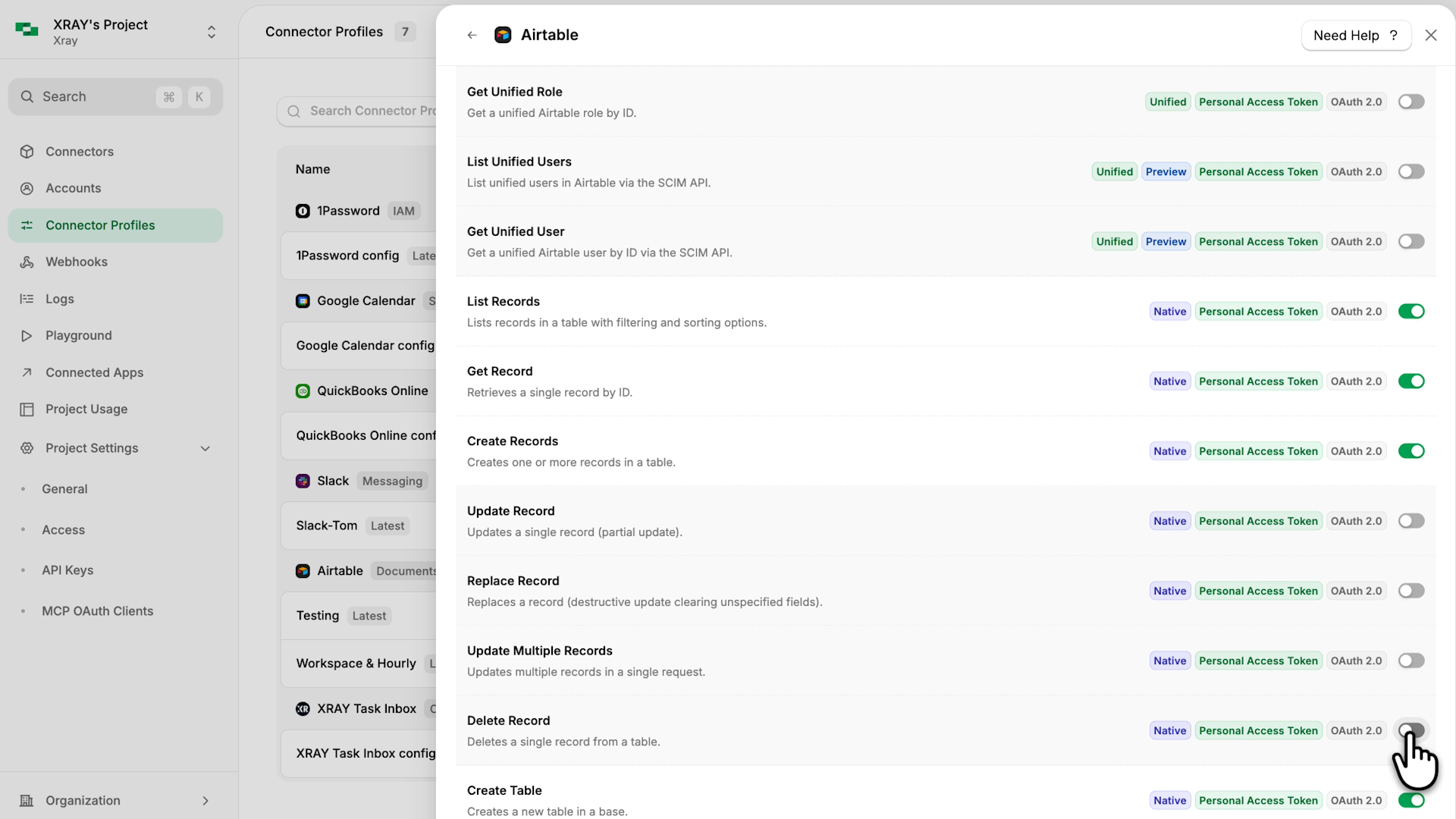
The permissions work now happens inside StackOne. For each new project, you don't mint a new API key; you create a connector profile and choose the exact access that project gets, toggling each individual action on or off.
For example, we’ve set up two connector profiles for the same Airtable connection. One team can read content records and add new ones, but can't edit what's already there.
Another team can read the customer base without adding or changing records.
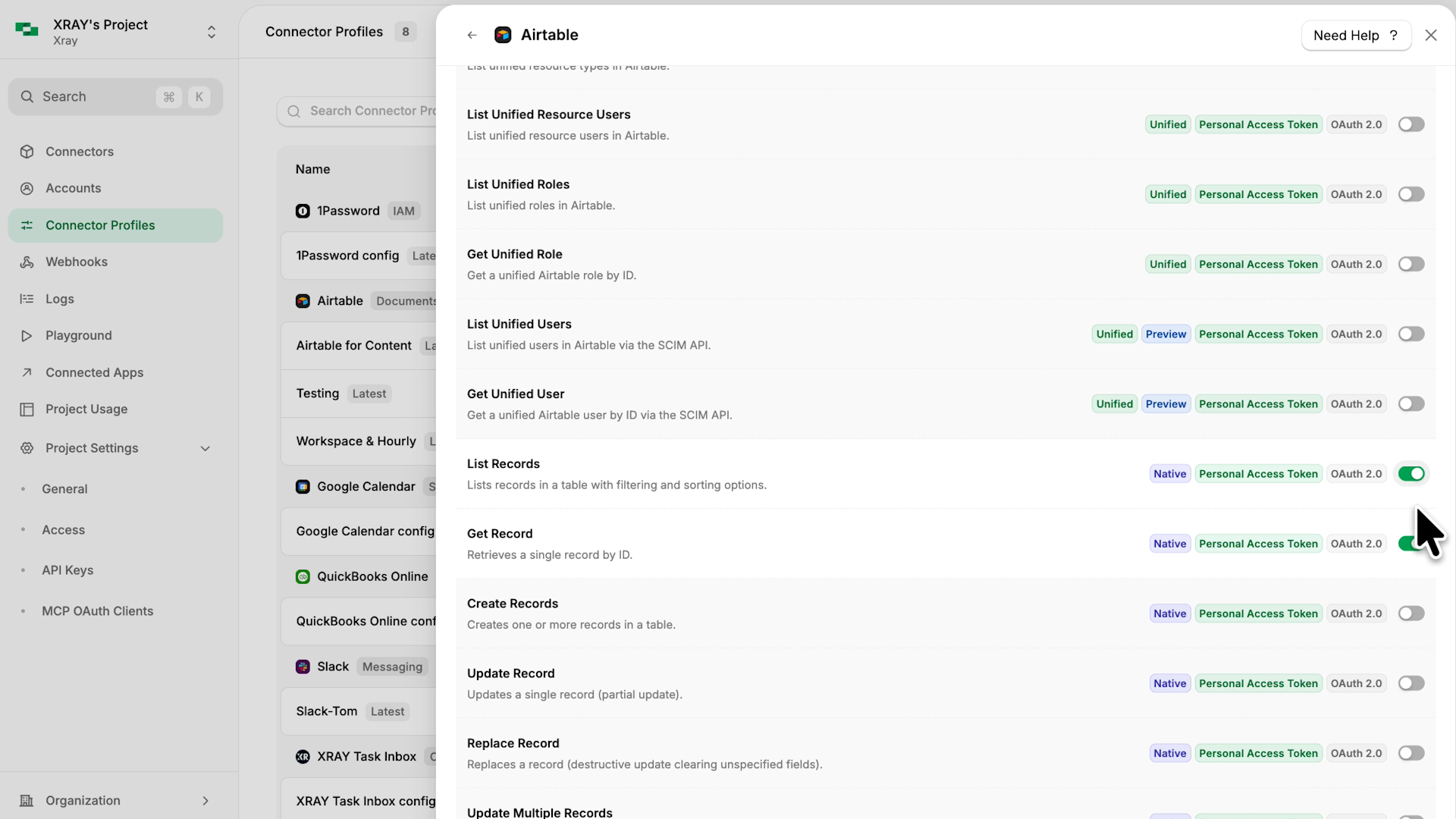
Those are two distinct profiles running on the same API token, in two different projects. All the configuration is done with a few clicks in StackOne. Then, they can both be managed in the exact same place.
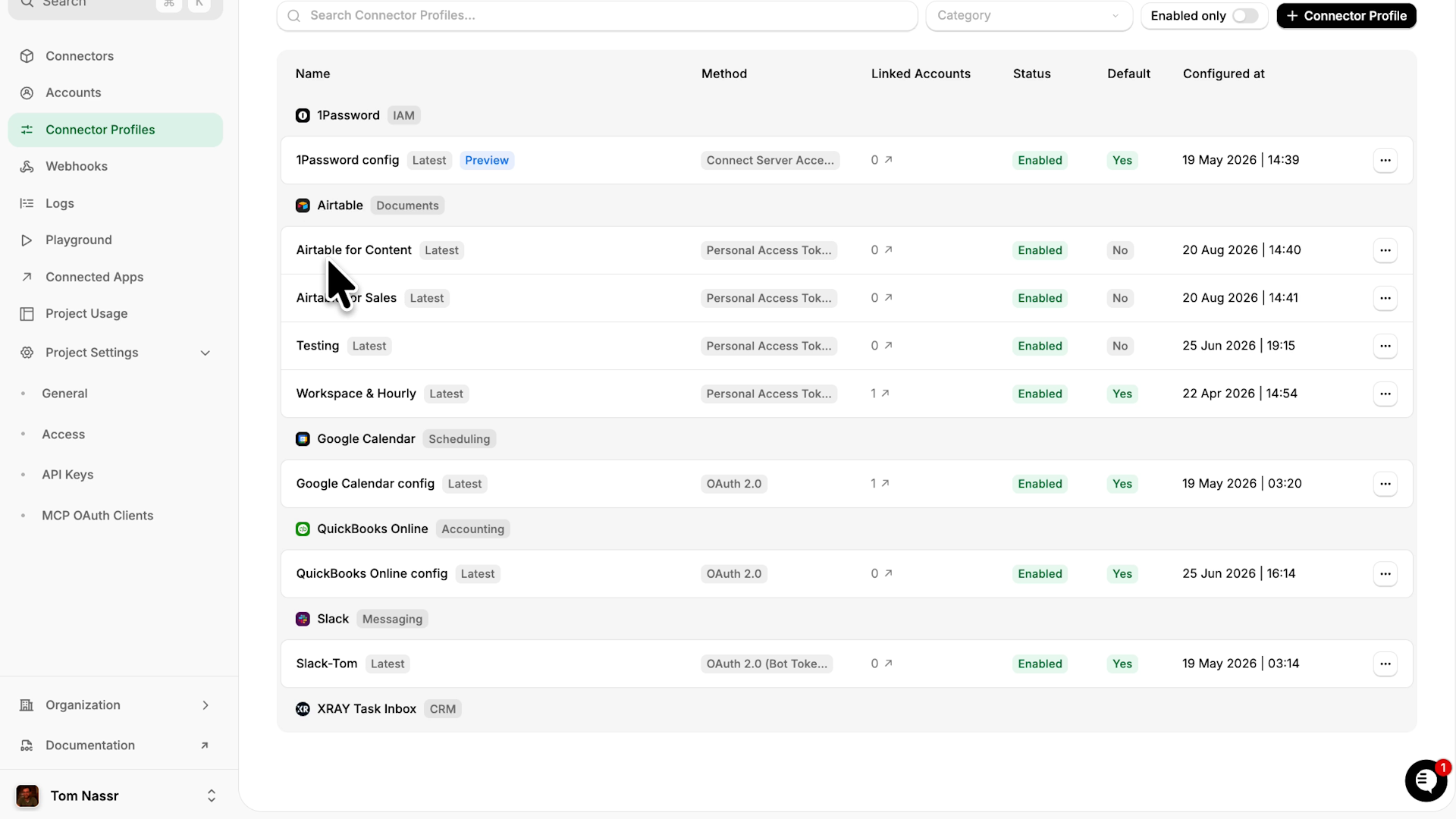
This is the part people miss. The goal isn't to lock everything down to read-only; read-only is safe, but it often can't do the job. The goal is that the thing your team builds can finally write, on carefully approved permissions.
A team can move a deal to the next stage without being able to delete it, or update a ticket without being able to close out the customer record. Those are the permissions that make a build worth doing, and they're exactly what a single static token can't give you safely.
Each department ends up with a key that reaches their apps and nothing else. IT keeps the one that reaches everything; the person with a Lovable account and a good idea gets the one that reads three things and writes to exactly one. That's about five minutes of clicking, and then somebody actually gets to go build the thing they asked you for three weeks ago.
You stop being the department that says no, and start being the place where builders get unblocked.
The permission settings are great, but the log is the thing that caught our eye first at XRAY.
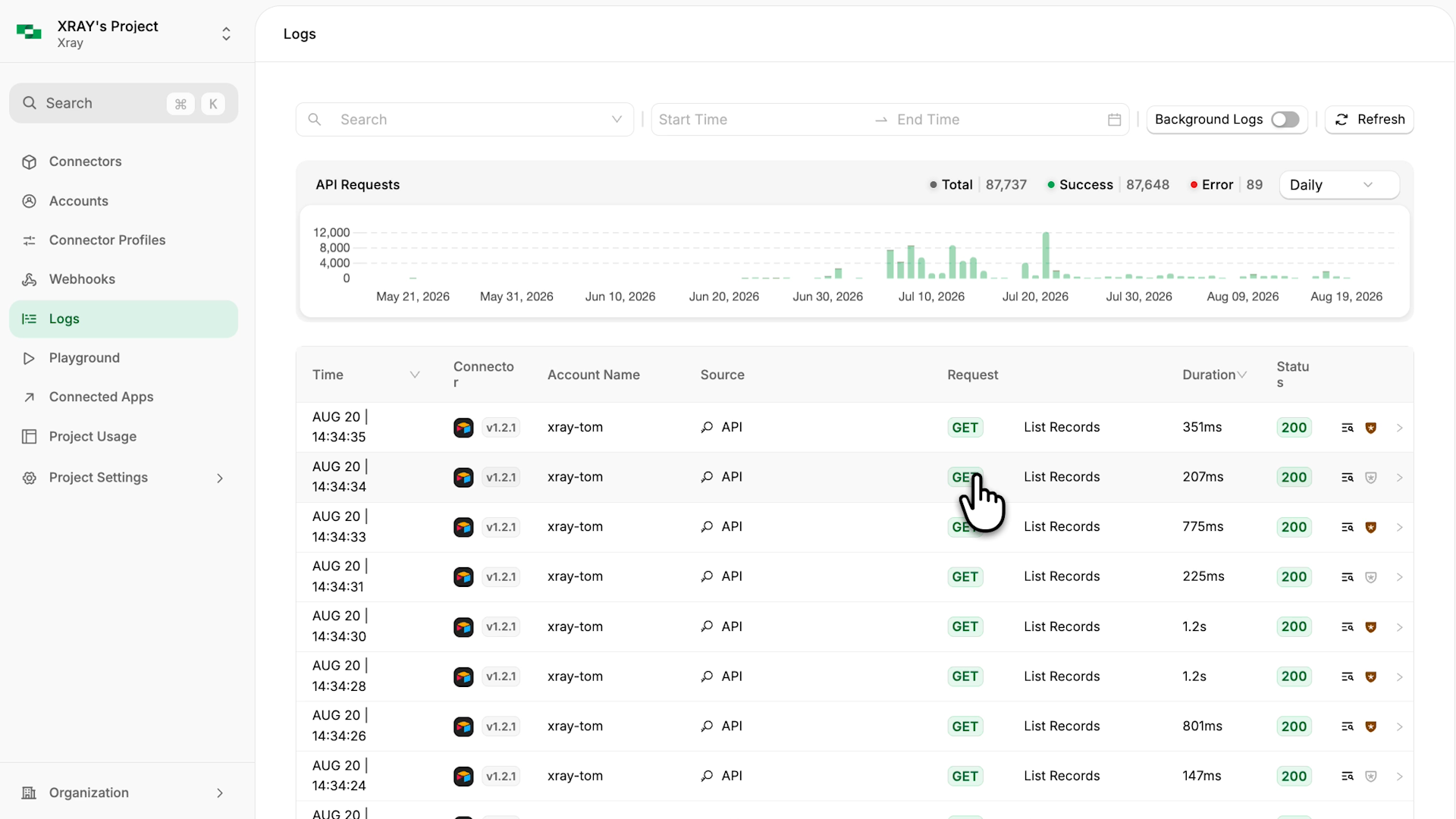
Turn on advanced logging for a project and you get every API call: when it was made, the full details of the request, and exactly what came back.
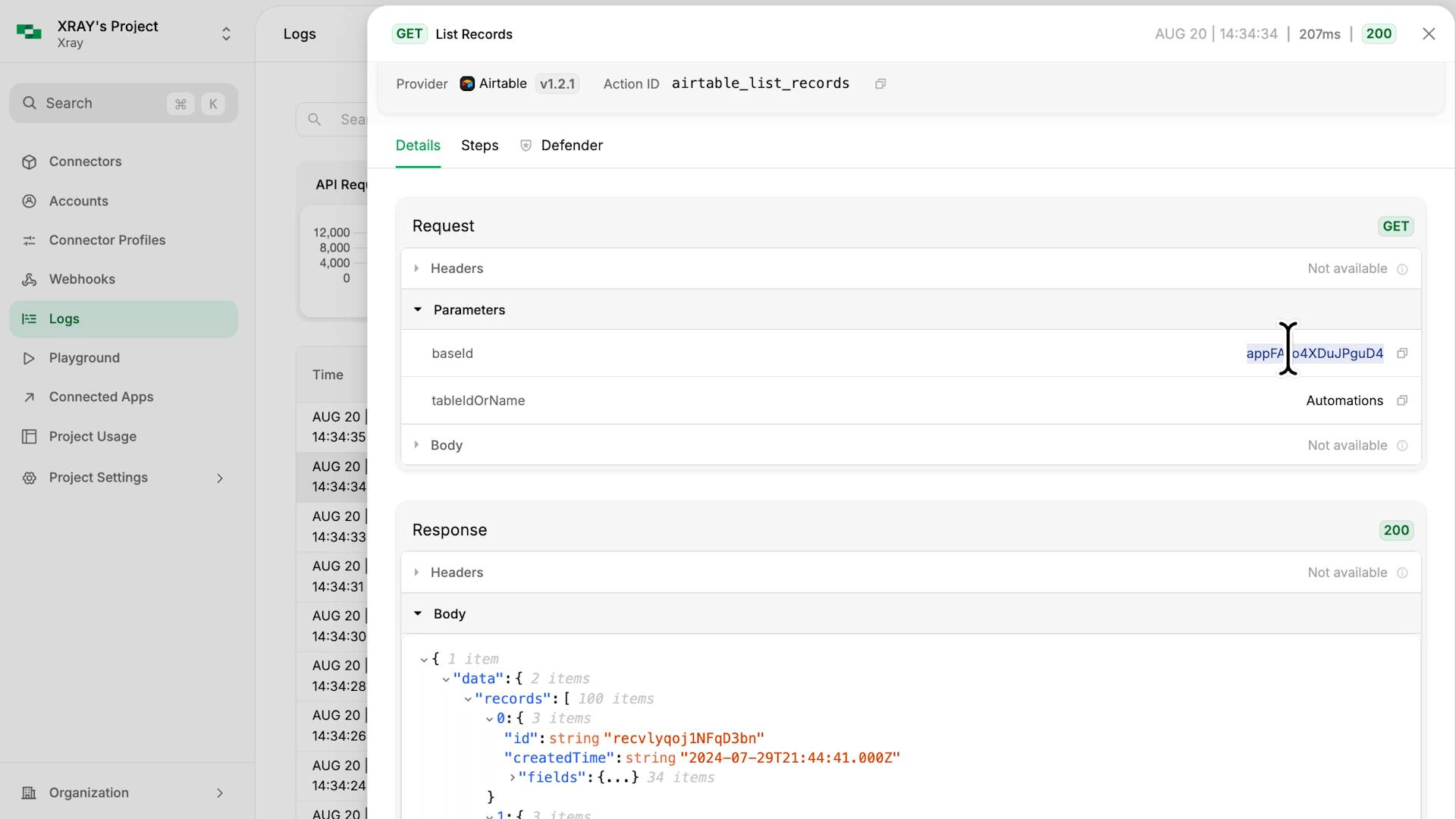
For instance, when we open up a “list records" call for Airtable, we can see the base it referenced, the table name, and the individual records included in the response.
That's every call, from every key, against every app you've connected, sitting in one list.
Think about what that replaces: six apps, six separate audit logs, several of which don't record API activity at all, none of which know the other five exist.
When somebody asks what a project has been touching, you open one page and answer the question.
That's observability, and observability is what makes handing out access survivable. When something goes wrong, the log shows you exactly what happened; you're not hunting through a dozen apps for the automation that hit a bug or the script that misfired.
Let's be clear about what StackOne is: a technical product, built for IT first. It's not a no-code tool and it doesn't pretend to be; setting it up means understanding what a token is, what a scope is, and what an API actually does.
That's not a complaint. It should own that, and it should feel like it was built for the people who will run it, because it was.
This is overkill for a solo operator or a small startup running three apps. It starts earning its keep when there are teams, requests, and somebody who has to answer for what could access what.
People go around the official process because they want to solve their own problems, and they know the tools to do it already exist. So make the official path the fastest one: one place to connect your apps, one connector profile per team, one log that shows you what happened.
Then say yes to the person who wants to build something. They already have access to that data; they're clicking through it by hand every day. This just lets them do something better with it.
StackOne has a free tier worth exploring, and XRAY is an official StackOne implementation partner. Our team will guide you through connecting your entire software stack, no matter which apps you run.
Send us your stack, and we'll tell you what StackOne already covers and what would need a custom integration.
Nobody should still be doing a job by hand because the safe way to automate it took too long to approve.
Shadow IT became shadow AI the moment your team could build agents. People are wiring Claude, Copilot and no-code tools into HubSpot, QuickBooks and Slack on their own API keys — and nothing logging what those tools read.